The Best Focus Timer With AI Coach Features: 7 Timer Apps Compared for 2026
Searching for the best focus timer with AI coach features? Here's the honest answer first: most focus timers have no AI at all. This comparison shows the few that do, what their AI actually does, and the best plain timers if a countdown is all you need.
A timer is the easy part of a focus session. The hard parts are knowing exactly what you're working on, noticing when you've drifted, and learning something from each session. That's where a coach comes in.
A timer counts down. A coach asks what you did with the time.
What an AI coach adds to a focus timer
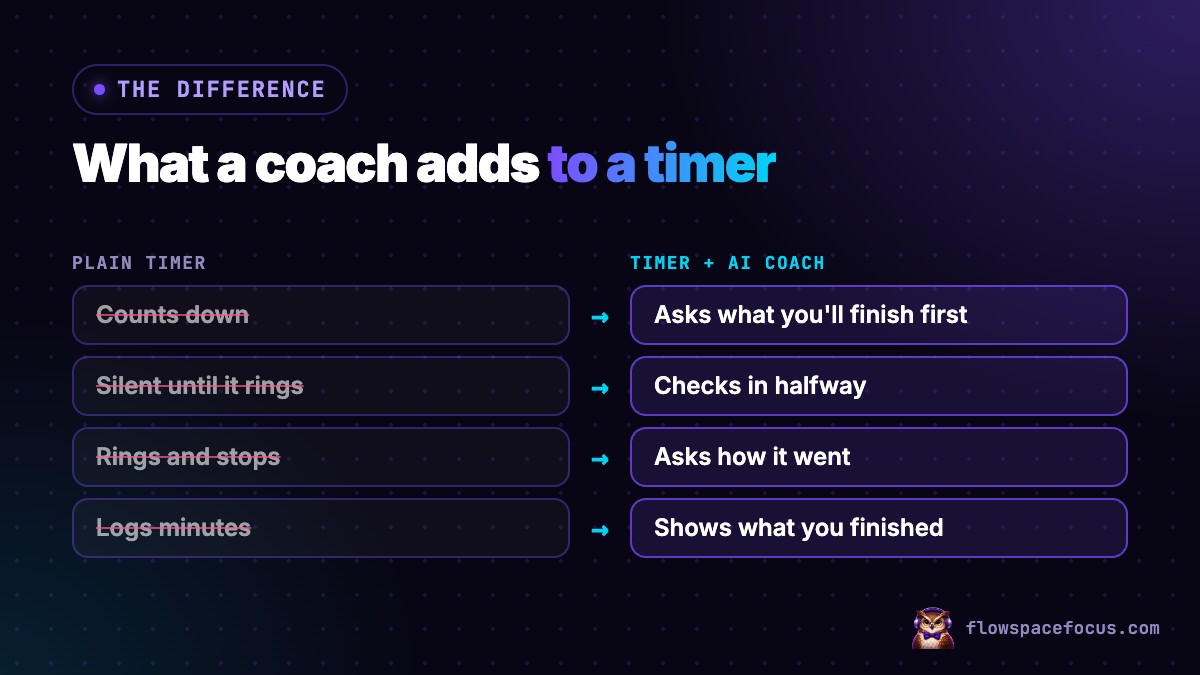
A plain timer does one job: it tells you when to start and stop. An AI coach adds three:
- A clear goal before you start. "Finish slides 4 to 8" instead of "work on the deck." Specific goals lead to better performance than vague ones.
- A check halfway through. It catches drift while it's small. Here's how mid-session check-ins work.
- A debrief at the end. What you finished, what got in the way, and what's next. Tracking progress makes you more likely to reach your goals.
The best focus timer with AI coach features, compared
What the AI does
| App | AI feature | Mid-session check | After-session review |
|---|---|---|---|
| FlowSpaceFocus | AI coach (Owliva): goal, halfway check, debrief | Yes | Yes |
| Focus Bear | AI distraction detection | AI nudges when you wander off | Not listed |
| Tiimo | AI co-planner | Not listed | Mood log and reflection |
| Focusmate | None (human partner) | No | Check-in with partner |
| Session | None | No | Not listed |
| Forest | None | No | No |
| Pomofocus | None | No | No |
Timer, platforms and price
| App | Timer | Platforms | Price (as listed) |
|---|---|---|---|
| FlowSpaceFocus | 7 Focus Flows, 25 min to 7-Hour Workday, plus session history | Web (desktop and mobile browser) | $39.99/year, 7-day trial |
| Focus Bear | Pomodoro | Mac, Windows, iOS, Android | Free plan; Pro $9.99/month |
| Tiimo | Focus countdown inside a planner | iOS, Android, Mac, web | Free version; Pro varies by region |
| Focusmate | 25, 50 or 75 min with a partner | Web, video | 3 free a week; Plus $8 to $12/month |
| Session | Custom session and break lengths, analytics | Mac, iOS, Apple Watch | Free tier; Pro $4.99/month or $39.99/year |
| Forest | Focus timer, tree grows while you focus | iOS, Android, browser | Core free; Plus varies by region |
| Pomofocus | Customizable Pomodoro | Browser | Free; premium available |
App-by-app
FlowSpaceFocus: a timer built around an AI coach
Our own app. You pick one of seven Focus Flows (from a 25-minute Classic Pomodoro to a 7-Hour Workday) and one of six focus playlists. Owliva asks for one specific goal before the timer starts and pushes back if it's vague, checks in at the halfway point, and runs a short debrief after. Session history shows when your sessions are strongest and which playlists work best for you.
- Choose it if: you want the goal, the check-in and the debrief built into the timer.
- Skip it if: you need app blocking, a native app, or a free plan. The 7-day trial needs a card, and then it's $39.99 a year.
Focus Bear: a timer with AI that guards your attention
Focus Bear pairs Pomodoro sessions with app and website blocking across all your devices. Its AI distraction detection asks what you're working on and nudges you back when you wander off.
- Choose it if: your phone and browser are the main problem.
- Skip it if: you want help setting goals or reviewing sessions. That isn't what its AI is for.
Tiimo: a timer inside an AI planner
Tiimo's focus countdown lives inside a visual daily planner. Its AI turns your task list into steps with time estimates and puts them on a timeline. Mood check-ins and reflection help you spot patterns.
- Choose it if: you lose the day before you even start a session.
- Skip it if: you already know what to work on and need help staying on it.
Focusmate: a timer with a human instead of AI
Not AI, but worth a place: Focusmate's 25, 50 or 75-minute sessions pair you with a real person on video. You share goals at the start and check in at the end.
- Choose it if: another person watching is what keeps you working.
- Skip it if: you don't want to be on camera or book sessions ahead.
Session, Forest and Pomofocus: the best plain timers
If you finish what you start and just want a clean countdown:
- Session (Mac and iOS) has custom session lengths, a session log and Mac site blocking. Free tier, Pro from $4.99 a month, and 30% off for students.
- Forest grows a virtual tree while you stay off your phone and plants real trees through a partner. Core features are free.
- Pomofocus is a free, customizable Pomodoro timer in the browser, with a Todoist integration.
How to pick the right focus timer
- Look at your last five sessions. Did you finish what you meant to? If yes, a plain timer is enough.
- If you drift mid-session, pick a timer with a mid-session check: FlowSpaceFocus, or Focus Bear's AI nudges.
- If you finish but never know what you got done, pick one with an after-session review: FlowSpaceFocus or Focusmate.
- If the problem is distracting apps, pick blocking: Focus Bear, Session on Mac, or Forest on your phone.
- Start at 25 minutes with the Pomodoro Technique, whichever app you choose, and lengthen sessions once you finish most of your goals.
For a walkthrough of one coached session, see how to use an AI accountability coach during a 25-minute session.
Quick answers
Which focus timer has an AI coach?
Few do. FlowSpaceFocus has Owliva, an AI coach that checks in before, halfway through and after each timed session. Focus Bear has AI distraction detection that nudges you back to your task. Tiimo has an AI planner and a focus countdown. Most other timers, like Forest, Session and Pomofocus, have no AI.
Do I need an AI coach, or is a plain timer enough?
If you start sessions and finish them, a plain timer is enough. If you start and then drift, or finish without knowing what you got done, a coach that checks in halfway and asks about the result covers the gap a timer can't.
What's the best free focus timer?
Pomofocus is free in the browser, Forest's core features are free, Session has a free tier, and Focus Bear's Essentials plan is free with 25-minute Pomodoro sessions.
Is the Pomodoro Technique still worth using?
Yes, as a starting point. 25 minutes is short enough to start on a hard day. Once you finish your goals in most sessions, try longer blocks of 45 to 90 minutes.
Keep reading
Want a timer that checks in halfway and asks how it went?
Try FlowSpaceFocus free for 7 days →